
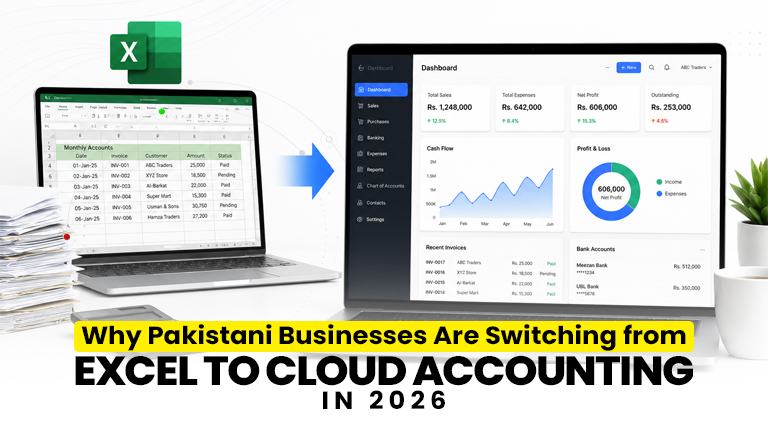
For years, Excel spreadsheets and handwritten ledgers were good enough for most Pakistani businesses. In 2026, that’s changing fast. Between FBR’s mandatory digital invoicing, rising audit pressure, and the need for real-time financial visibility, more and more businesses are moving from Excel to cloud accounting software. This guide explains exactly why the shift is happening — and what it means for your business.
Why is Excel no longer enough in 2026?
Excel was never built for tax compliance or real-time reporting — and in 2026, that limitation has become a serious problem. With FBR now requiring registered businesses to transmit invoices electronically and in real time, manual spreadsheets simply cannot keep up. They can’t generate FBR-compliant invoices, connect to PRAL’s system, or produce the QR-coded receipts customers can verify.
Beyond compliance, Excel makes everyday financial management slow and error-prone. A single wrong formula or deleted row can throw off your entire month’s books — and you often don’t notice until tax season.
Key takeaways
- FBR compliance: Excel can’t generate real-time, FBR-compliant e-invoices.
- Fewer errors: Cloud software automates calculations and reduces mistakes.
- Real-time visibility: See profit, stock, and cash flow instantly.
- Access anywhere: Cloud lets you check your books from any device.
- Audit-ready: Clean, organised records make tax season stress-free.
The hidden cost of running your business on spreadsheets
Most business owners underestimate how much Excel actually costs them — not in rupees, but in time, errors, and missed opportunities. Here’s what spreadsheet-based accounting quietly takes away:
- Wasted hours: Manually entering and reconciling data eats up days every month.
- Human errors: One wrong formula can distort your entire profit and loss.
- No real-time view: You only learn how your business is doing weeks later.
- Compliance risk: Spreadsheets can’t meet FBR’s digital invoicing requirements.
- Data loss: A corrupted file or lost laptop can wipe out months of records.
Reality check: When your accountant spends three days compiling reports from multiple spreadsheets, that’s three days not spent growing your business. Cloud accounting software produces the same reports in seconds.
Excel vs cloud accounting software — a clear comparison
| Factor | Excel / Manual | Cloud Accounting Software |
|---|---|---|
| FBR digital invoicing | Not possible | Built-in, real-time |
| Error rate | High (manual entry) | Low (automated) |
| Financial reports | Hours of work | One click |
| Access | One computer only | Anywhere, any device |
| Data backup | Manual / risky | Automatic, secure |
| Multi-user | Difficult | Role-based access |
| Inventory + accounting | Separate files | Connected in one system |
What is cloud accounting software?
Cloud accounting software is a system that stores your financial data securely online, so you can manage invoicing, bookkeeping, inventory, and tax compliance from anywhere — without installing anything on a single fixed computer. Unlike Excel, it automates double-entry bookkeeping, calculates taxes correctly, and connects directly to FBR’s digital invoicing system.
In simple terms: you create a sale, and the software automatically records the accounting entry, updates your inventory, and submits the invoice to FBR — all at once.
Top reasons Pakistani businesses are switching in 2026
- FBR digital invoicing complianceFBR e-invoicing is now mandatory for registered businesses. Cloud software handles it automatically, so you avoid penalties. Learn more in our guide to FBR digital invoicing.
- Real-time financial visibilitySee your profit, expenses, receivables, and stock the moment they change — not weeks later.
- Fewer costly errorsAutomated tax and total calculations remove the manual mistakes that spreadsheets are prone to.
- Work from anywhereCloud access means you can check your books from your phone, at home, or while travelling.
- Connected operationsAccounting, POS, inventory, and HR work together in one system instead of scattered files.
Cost is usually what stalls this decision, so for scale: AmalERP, the cloud product from the same team, starts at Rs 2,500 a month with a 7-day free trial and no credit card. That is enough to rebuild one month of your Excel workbook inside real accounting software before you commit to anything.
How to move from Excel to cloud accounting smoothly
Switching doesn’t have to be painful. A good provider helps you migrate without losing your history:
- Import existing data: Your past records from Excel or other software can be brought in, so you don’t start from scratch.
- Choose FBR-ready software: Pick a system with built-in FBR digital invoicing so compliance is automatic.
- Train your team: A user-friendly interface keeps training short and simple.
- Start with the essentials: Begin with invoicing and accounting, then add inventory, POS, and payroll as you grow.
Tip: If your business deals with sales tax, make sure your new software supports both FBR and SRB compliance — and can generate the sales tax registers you need at filing time.
How Switcher Techno can help
Switcher Techno offers cloud-based accounting software built specifically for Pakistani businesses — with FBR and SRB compliance, automated bookkeeping, real-time inventory, and detailed financial reports in one place. Our team helps you migrate your existing Excel data smoothly, so you move to the cloud without losing your history. If you run a retail or restaurant business, our POS and inventory management software connects billing, stock, and accounting together. We also provide complete FBR digital invoicing support so every sale stays compliant.
Ready to leave Excel behind?
Move your accounting to the cloud and stay FBR-compliant — without the spreadsheet headaches. Book a free demo today.
Book a Free DemoFrequently Asked Questions (FAQs)
Why are Pakistani businesses moving away from Excel?
Because Excel cannot meet FBR’s mandatory digital invoicing requirements, is prone to manual errors, and offers no real-time visibility. Cloud accounting software solves all three by automating compliance, calculations, and reporting.
Is cloud accounting software FBR-compliant?
Yes. Good cloud accounting software comes with built-in FBR digital invoicing, automatically generating compliant invoices with QR codes and submitting them to FBR in real time.
Will I lose my old data when switching from Excel?
No. A proper provider helps you import your existing records from Excel or other software, so you keep your financial history and start with everything in place.
Can cloud accounting software be accessed from anywhere?
Yes. Cloud software stores your data securely online, so you can manage your accounts from any device — phone, laptop, or tablet — wherever you are.
Is cloud accounting software suitable for small businesses?
Absolutely. Cloud accounting is ideal for small and medium businesses in Pakistan because it reduces errors, saves time, ensures FBR compliance, and grows with your business.
Disclaimer: This article is for informational purposes only and should not be considered legal or tax advice. FBR rules and compliance requirements are subject to change. For your business’s specific obligations, please refer to the FBR’s official website (fbr.gov.pk) or consult a licensed tax advisor.
